1

I'm trying to dual boot my 2018 Mac Mini with Ubuntu Server but I'm stuck at Storage Configuration page.

Let me show my problem:

  1. Created bootable disk. For this I used my 1TB TOSHIBA external HDD.
  2. Created a new partition on my Mac Mini. I have a 512 GB SSD on it.
    1. Opened Disk Utility
    2. I used the circular handle to resize the new partition for Linux to 370GB leaving MacOS with 130GB.
    3. I named this partition UBUNTUSRV.
  3. Disabled T2 Boot security
  4. Rebooted my Mac and held the Option key while it was starting.
  5. Selected the "EFI Boot".
  6. Selected *Try or Install Ubuntu Server.
  7. Selected language, keyboard layout etc. and got to the Guided storage configuration page. I chose Custom storage layout.
  8. Storage configuration.
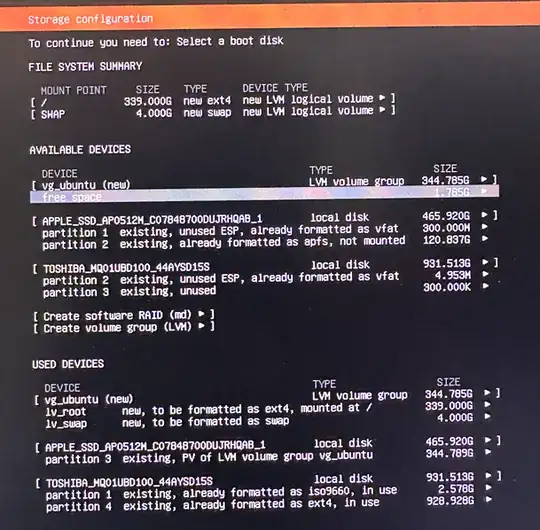
    1. Find the partition you created. Somehow it wasn't the same size I created. I had created 370GB but it showed 344.789G.

    2. Select Create volume group and hit enter.

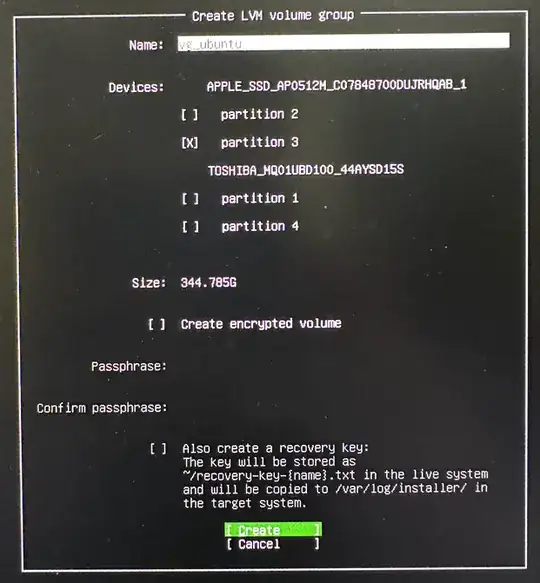
      1. Name: vg_ubuntu

      2. Select the partition you created. You'll see 2 partitions under APPLE_SSD_AP0512M_CO.... One is 120.835G, other is 344.785G. Select the 344.785G one.

      3. Create

        volume group created
    3. Now you'll see 2 new devices:

      1. vg_ubuntu (new)
      2. free space
    4. Highlight free space, hit enter and click Create logical volume.

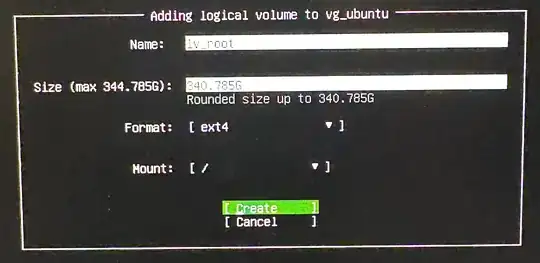
      1. Create logical volume

      2. Name: lv_root

      3. Size: 340.785G

      4. Format: ext4

      5. Mount: /

        logical volume created
    5. Highlight free space, hit enter and click Create logical volume.

      1. Create logical volume
      2. Name: lv_swap
      3. Size: 4.000G
      4. Format: swap
    6. Now the issue arises here. I can't proceed forward at this point because /boot/efi doesn't get mounted. And even when I try to edit it, i.e. partition 1 existing, unused ESP, already formatted as fat 300.000M>, the option to mount it is greyed out.
      efi not mounted   not able to click Done

I don't see this problem if I simply mount my Linux partition. Let me show what I mean.

  1. Storage configuration.
    1. Find the partition you created. Somehow it wasn't the same size I created. I had created 370GB but it showed 344.789G.

    2. Select the partition, hit enter and click 'Edit'.

      1. Format: ext4
      2. Mount: /
      3. Save
    3. At this point, I can click "Done" and proceed forward because my existing /boot/efi is recognized and mounted automatically. So my guess is that me creating LVM is not letting that happen?
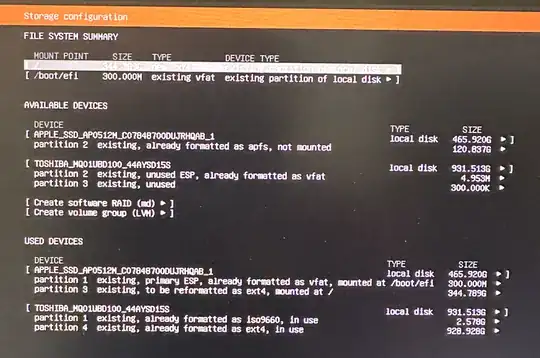
      efi is mounted   able to proceed

Questions:

  1. Is it not possible to create LVM while dual booting in Mac?
  2. Is there a way to fix this issue because I really want to use LVM? If there's a way, please guide me. Thanks.
Ash K
  • 113

1 Answers1

2

I found the steps you missed by using a VirtualBox virtual machine. My machine differs from yours in the following ways.

  • I Booted from the downloaded ISO file inserted in a virtual optical drive.
  • My machine's sector size is 512 Bytes and yours is 4096 bytes.
  • The EFI partition is 200 GiB and yours is 300 GiB.
  • Many sizes will not be exactly the same as you get.

I proceeded until I reached the following display, made the same choices as you did and then selected [ Done ], as shown below.

The next display is shown below. I proceeded by selecting Enter shell, as shown below.

I entered the command given below. If you are using a different block device, then enter the command lsblk to determine the correct block device to use.

fdisk /dev/nvme0n1

The results from entering the above command is shown below.

enter image description here

The fdisk command is interactive. The input can be taken from the "Entry" column of the table below.

Entry Type Comment
p command Print the partition table
d command Delete a partition
use default parameter Parition number (should be 3)
n command Add a new parition
use default parameter Parition number (should be 3)
use default parameter First sector (should be > end sector of /dev/nvme0n1p2)
+2G parameter Size in GiB
p command Print the partition table
n command Add a new parition
use default parameter Parition number (should be 4)
use default parameter First sector (should be > end sector of /dev/nvme0n1p3)
use default parameter Last sector
t command Change a partition type
use default parameter Parition number (should be 4)
44 parameter Partition type (44=Linux LVM)
p command Print the partition table
w command Write table to disk and exit

When finished, enter the exit command.

The next display is shown below. I proceeded by selecting [Reset], as shown below.

enter image description here

The display should update to show the changes made by the fdisk command, as shown below.

I made partition 3 the boot partition, as shown below.

I created the LVM on partition 4 by using your instructions. The results are shown below.

  • Hi David, Thank you so much this detailed answer. I'm traveling at the moment and away from home. I'll try this as soon as I get home. Few quick questions: 1. What does it mean when you say "...a different block device"? Block device as in the name of the partition I made for Linux, i.e. 344.789G partition? 2. Does this command fdisk /dev/nvme0n1 create a 2 GB boot drive out of 344.544G partition? 3. After I successfully install it, is there a way to keep a snapshot of it so I can always come back to a fresh install state if I mess something? Sorry I'm very new to this. Thank you! – Ash K Oct 10 '24 at 16:43
  • Asking about that snapshot thing (in question no. 3 above) as I heard that it's easier to do snapshots if I use LVM which is the reason why I wanted to do LVM setup. – Ash K Oct 10 '24 at 19:21
  • This is not the name of a partition. This is the name for the drive itself. I try to make my answers work for other users who might have the same question. For example, if someone else has an internal SATA drive, then the block device would probably be /dev/sda. In your case, the block device for your PCIe internal SSD drive is /dev/nvme0n1 2. yes, but it is a 2 GB boot volume stored in a partition on the drive. 3. You can make a snapshot of lv-root, but this will not include volumes mounted at /boot and /boot/efi.
  • – David Anderson Oct 11 '24 at 10:58
  • The files in the /boot directory (as subdirectories) are for Grub and the Ubuntu boot files. At the point where these files are read during booting, the boot software does not know what a LVM is. Therefore, these files are stored in EXT4 and FAT32 formatted volumes. Actually, the total space used by these volumes is fairly small. Only about 100 MB. – David Anderson Oct 11 '24 at 11:21
  • Thank you for these great answers. I greatly appreciate it. What would you recommend if I wanted to keep my fresh install state as like a checkpoint that I can come back to later? I'm still away from home and might get back home after a week or so, and I'll give this a try and let you know how it goes. – Ash K Oct 13 '24 at 04:11
  • Just got a chance to try your answer out and it worked flawlessly! Thank you so much David! Now I'm on next steps: to make sure it has all the drivers. Could you please help me with my next question? It's here: https://askubuntu.com/q/1551516/1967188 – Ash K Jun 25 '25 at 23:36