You may try connecting from the command line. First create a new mobile broadband connection. To do so:-
- Connect your modem. Then select 'New Mobile Broadband connection...' from the panel(aka menu bar) as shown below.
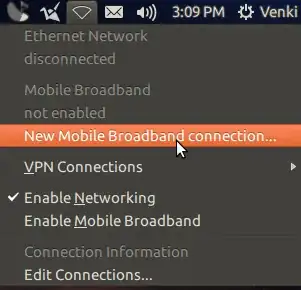
- Then in the following window press continue.
- Then select your country.
- In the subsequent window select your ISP.
- Then press 'Continue' and then 'Apply'.
Now open the terminal with Ctrl+Alt+t . Then type the following command :-
nmcli connection
An output similar(not exactly) to the one below will be shown :-
NAME                      UUID                                   TYPE              TIMESTAMP-REAL
Wired connection 1        ef7249c9-13bf-4d4c-9d5e-14c79371be9e   802-3-ethernet    Monday 21 April 2014 11:23:20 AM IST
BSNL/CellOne New GPRS/3G  a1f89d7a-12d0-4ef8-b76d-cb6e31b11697   gsm               Monday 21 April 2014 03:22:39 PM IST
As you can see the output displays all the connections that you have created. Now in the above case if I have to connect with 'BSNL/CellOne New GPRS/3G' then I will type the following command:-
nmcli connection up uuid a1f89d7a-12d0-4ef8-b76d-cb6e31b11697
As you can see I have typed the UUID of the connection that I want to connect to. So according to your connection you have got to give the UUID in the above command.
sudo stop modemmanager. 2.Plugin modem and wait for 20 seconds. 3. Runsudo start modemmanager. Now, Within 20 second, new/existing connection appears in notification area. And you are able to connect (permanently/not-disapperead)! – Pandya Oct 11 '14 at 09:47